Superwall vs RevenueCat: Which is right for you?
February 11, 2026 at 04:27 PM
I've recently been implementing paywalls in a mobile app for the first time and originally chose Superwall for its superior customization. However, after realizing many drawbacks of Superwall, I've switched to RevenueCat in my Flutter app (previously an Expo app). Many of the questions I had about both platforms were, for some reason, not easily found online (or perhaps are buried in obscure blogs like this one) so I wanted to take the time to note my findings.
Let's start with the pros and cons of each platform, then dive into the details.
Quick Comparison Table
Feature | Superwall | RevenueCat |
Pricing Model | MAR (Attributed Revenue) | MTR (Tracked Revenue) |
Free Tier | Up to $10K MAR | Up to $2.5K MTR |
Targeting | Advanced (server-side) | Basic (client-side and attributes) |
Reliability | Recent reported instabilities | Industry gold standard |
API | None (Planned) | Full REST API |
Subscription Management | Manual/Custom | Built-in "Customer Center" |
Superwall at a Glance
Pros
Incredibly powerful targeting system: target placements based on endless different combinations of criteria such as days since some event, whether the user has certain entitlements, and how often the user is allowed to see the placement.
Most flexible paywall editor I've seen: add several products to a paywall, dynamically set almost any component parameter (text, padding, color, etc.) based on flexible criteria, and easy-to-use custom parameters (client-provided variables).
Cheaper option: pricing is based on monthly attributed revenue (MAR) instead of monthly tracked revenue (MTR), and the platform is free until $10K MAR (unless you opt for a higher-tier plan).
Better templates: I found these much better and more plentiful than RevenueCat. They also run the website Paywall Screens which displays tons of different paywalls from real apps.
Interesting features: features like the AI-powered demand score to estimate the purchasing intent of a user might be worth exploring.
Cons
Recent reports of downtime: in their Discord, users are reporting dashboard and paywall downtime over the course of a few weeks. The first wave of reports was just for the dashboard (i.e. paywalls still working). The most recent wave concerns paywall downtime and proof of lost revenue (app users asking why they can't make a purchase).
Entitlement bugs: I have (had) a fairly complicated subscription plan configuration. Even so, it's very clear which plan is meant to give which entitlements. Superwall consistently gave the wrong (too many) entitlements for a given plan. This bug was acknowledged and escalated to engineering in my support request.
No subscription management center for customers: at least from what I can tell. I could not easily find any such information.
Paywalls segregated by platform: paywalls for Android are not shared with paywalls for iOS, and so on.
Lack of integrations: they have a ton of integrations that are "planned" or "coming soon" but only a few that are actually complete (11 plus custom DIY webhooks at the time of writing).
No API: a REST API is in the works according to Superwall, but at the time of writing there is no functional API.
RevenueCat at a Glance
Pros
Reliable and reputable: while I'm sure RevenueCat has uptime issues of its own from time to time, I feel more confident that my users will be able to make purchases.
Entitlements work: this shouldn't be a differentiating factor but it unfortunately is.
Has an API: allows for querying and updating customers, products, etc.
Better integrations: 31 integrations plus custom DIY webhooks at the time of writing. Because it has an API, there are also other platforms that integrate with RevenueCat such as TrustMRR.
Shared paywalls: paywalls are not segregated by platform.
Subscription management center: customers can manage their subscription, ask for refunds, etc.
Cons
Very basic targeting system: the weakness of this system was my reason for originally choosing Superwall. The available conditions for targeting users for certain offerings or placements is limiting to the point that it's unusable in my case (e.g. cannot target based on active entitlements).
Basic paywall editor: I think this has improved since the last time I checked RevenueCat, but it's still pretty limiting. Dynamic values are almost non-existent, and paywalls can only be tied to one specific offering. An offering also cannot be used in multiple paywalls. Custom variables also seem difficult to use outside of native applications.
More expensive: only free until $2.5K MTR, and pricing is based on MTR rather than MAR.
Fewer templates: there are 37 in total, and they are not as nice as Superwall's.
Deep Dive
I've briefly covered the main points, so let's dive into each one with visual examples to understand the differences between the two platforms.
Superwall Deep Dive
Incredibly powerful targeting system
This was my main reason for initially choosing Superwall. Very complex targeting rules can be fully managed from Superwall without updating the app. In RevenueCat, complex logic like this would need to be handled in app code unless you got pretty clever with custom user attributes.
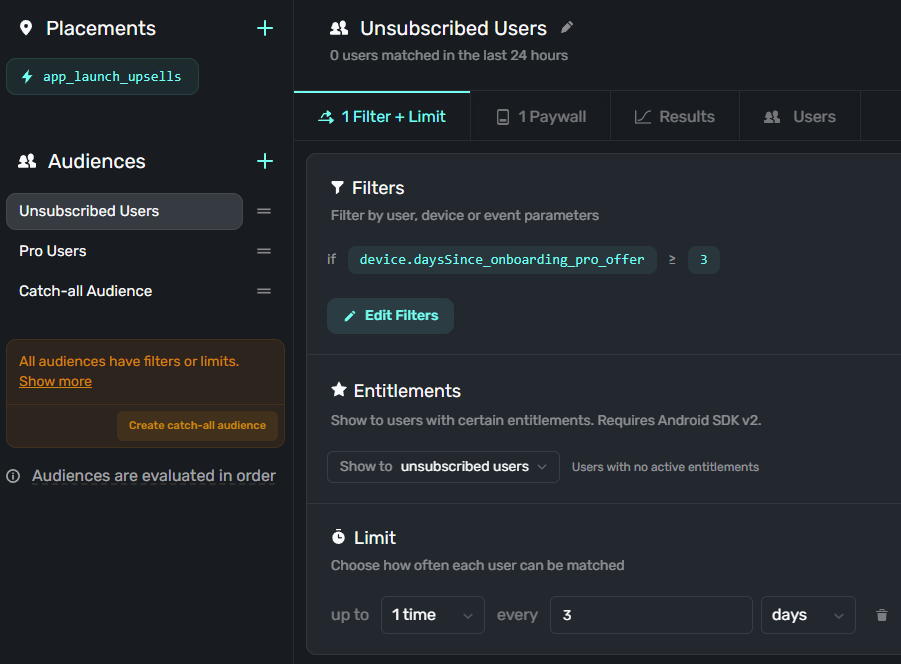
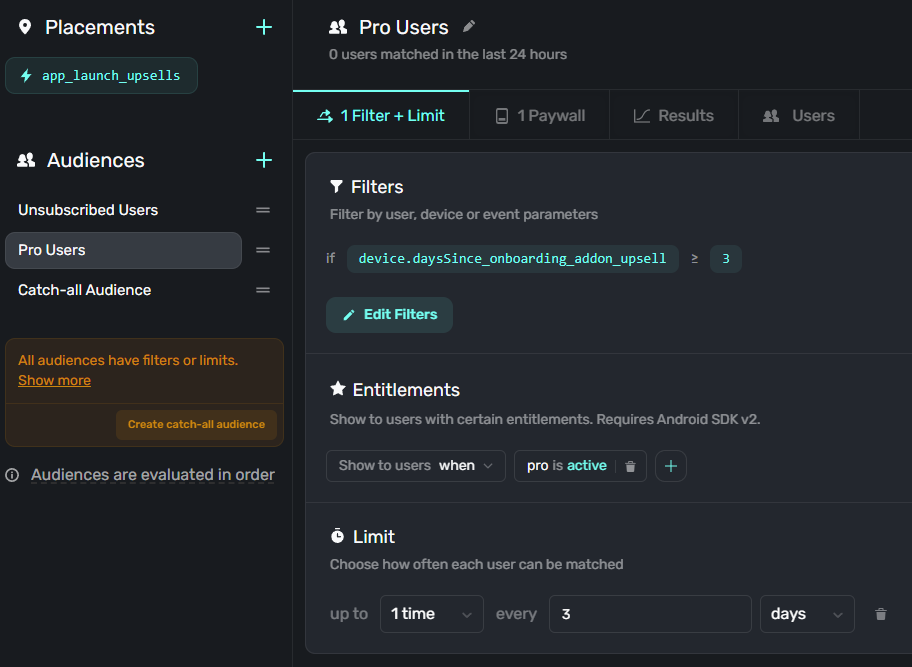
In the above two examples, you can see that I have a single campaign (placement) configured with three different audiences.
The first audience sees a paywall if they aren't subscribed and haven't seen the
onboarding_pro_offerplacement in the past three days. Additionally, this placement is only shown to the audience once every three days at most. In other words, I can just add one line in my app to invoke this placement whenever the app launches, and I don't need to add any custom logic to ensure the user doesn't see the paywall too frequently.The second audience sees a paywall if they are subscribed to the basic plan and haven't seen the
onboarding_addon_upsellplacement in the past three days. Similar to the first audience, the audience only sees this placement once every three days at most.
Both audiences also see different paywalls (different products/offerings).
As far as I can tell, this level of flexibility in RevenueCat is simply impossible without tracking this data or implementing this logic yourself in code, or getting creative with customer attributes.
Most flexible paywall editor I've seen
There are several features in Superwall's editor that are not present in RevenueCat. Namely: multiple products, surveys, and dynamic values. Take a look:
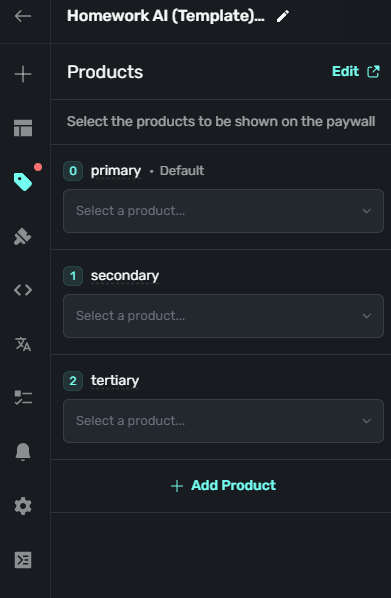
Choose multiple products to add to your paywall. Your buttons' tap actions can trigger purchase of a particular product, switch the selected product, etc. Really great for offering several products in a single paywall. For example: different tiers of a subscription, using a single paywall as a sort of consumables shop for a game, etc.
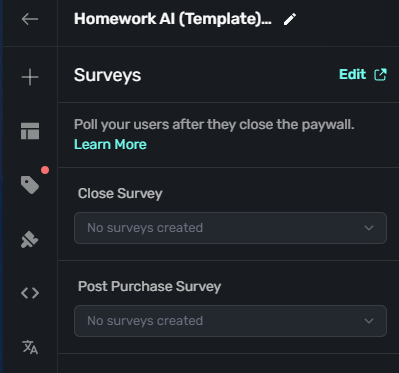
Run exit surveys based on a user's decision. You can choose to run a survey if they canceled the paywall, if they purchased a product, or both.
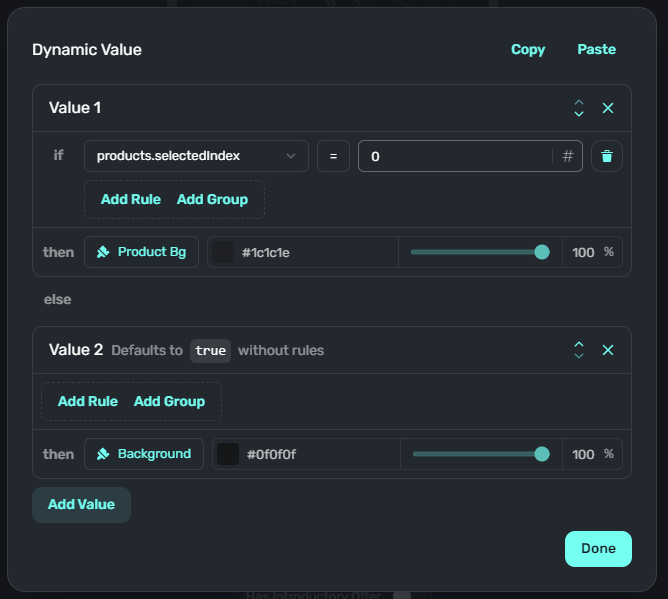
This is my favorite part of the editor. Lots of different conditions to use to trigger dynamic logic. Example conditions: selected product, device geolocation, device theme, installation date, user's "demand score" (as briefly described above), or even whether the device is in "low power mode." This allows you to tailor the paywall to specific scenarios without needing to create an entirely separate paywall.
Better templates
There are just more templates with more diverse designs compared to RevenueCat. Here are a few examples (don't mind the overlapping text -- that's due to me manually modifying the CSS to fit as many templates as I could on the screen):
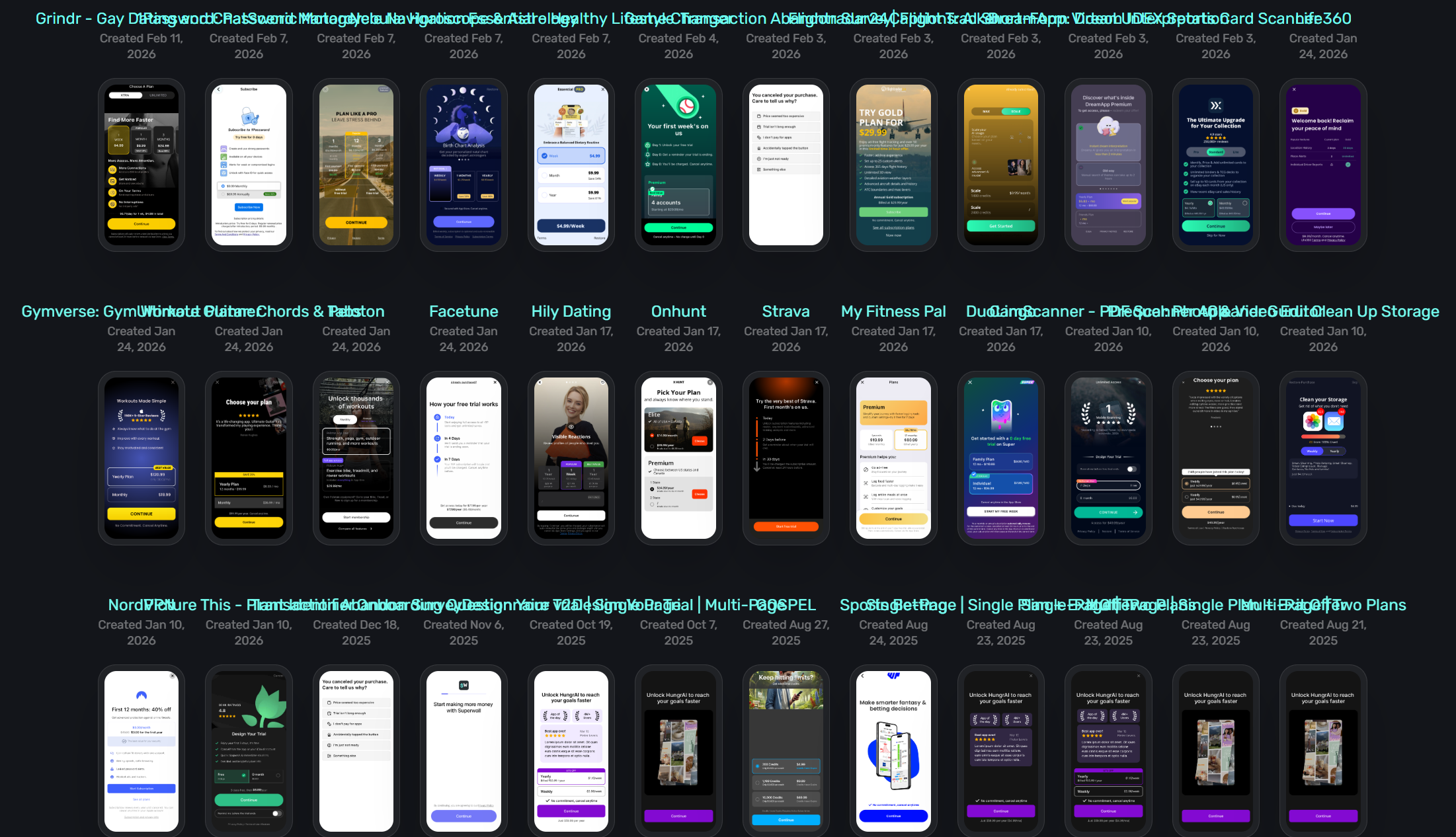
There are currently 182 templates in total, and their templates page says they'll create any design for you within one week. I believe they use paywalls from real, successful apps as their templates, so the designs tend to be much higher quality than RevenueCat (in my opinion).
But let's get into some negatives...
Lack of integrations
There are in total 11 dedicated integrations at the time of writing: Facebook Pixel, Mixpanel, Adjust, Amplitude, Statsig, PostHog, Customer.io, Firebase, Appstack, Slack, and Discord. You can also create your own webhooks.
What's most surprising is the absence of AppsFlyer from this list. As it is the de facto standard MMP, it's surprising not to see it here. It's not even on their "coming soon" list. That aside, Superwall happens to have all of the other integrations I use: Customer.io and PostHog.
By the way, here are the integrations they have planned: Meta Conversion API, AppStance, Braze, Singular, Kochava, CleverTap, mParticle, Segment, Airbridge, Branch, Tenjin, SplitMetrics Acquire, OneSignal, Airship, Intercom, and Iterable. Again, strange that they have other MMPs planned for integration but not AppsFlyer.
No API
This is a big one for me especially because their targeting is so flexible. It's a shame that there is not yet an API for programmatic updates. An API is planned, but I do not know if it allows mutations or if it is read-only.
A data loop I do is something like this:
User pays for subscription
User's subscription expires
This starts an expiration journey in Customer.io
Journey waits for some days
Journey determines the customer is qualified for an exclusive discount
Journey sends an API request to the paywall provider to tag the user as eligible for a discount
Journey sends the customer a push and email notification letting them know they're eligible for a discount for 3 days
Journey waits for 3 days
Journey sends an API request to the paywall provider to tag the user as no longer eligible for a discount
Here's what that journey looks like in Customer.io:
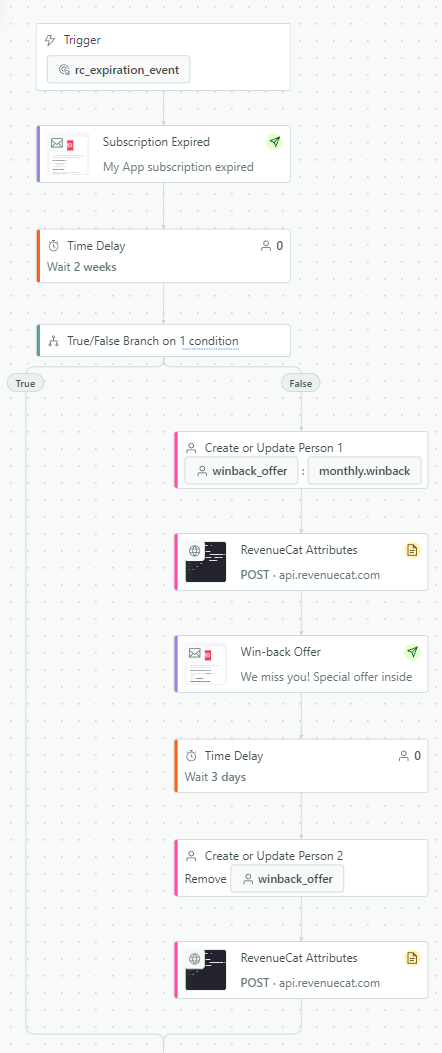
With this approach, I do not need to use promo codes: if they are static codes they may get leaked; if unique codes I have to build a system to generate/fetch one, provide it to the user, and implement a promo code input in the app. Instead, the user is tagged as qualified for a discount which shows them a special paywall with the discount already included. No special actions or logic needed from me. But it is not possible with Superwall because there is no API.
No subscription management center for customers
This was something I had in the back of my mind for a while: having to build out a UI to allow users to manage their subscription. When I switched to RevenueCat, it just happened to be solved due to the fact that RevenueCat has their "Customer Center" feature which just requires one line of code to invoke the UI. I'm not sure what the standard approach for this in Superwall is (or if there even is one), but I imagine it would take some work on my end to do well.
Entitlement bugs and reports of downtime
Finally, these two are what really eroded my trust in Superwall and caused me to switch to RevenueCat. I have a handful of subscriptions that are, at a simplified level, configured like this:
Subscription 1: grants entitlement A
Subscription 2: grants entitlements A and B
Subscription 3: grants entitlements A and C
Subscription 4: grants entitlements A, B, and C
This is a bit of a convoluted setup -- and I did ultimately choose to simplify it for both my sake and users' sakes (it's a bit hard to understand, which could increase refunds). Regardless, I found the entitlements were not granted correctly.
Upon purchasing subscription 1, the following happens:
In Superwall's customer details UI, the customer's entitlements are shown as "subscription 1" and "consumable." That's a bit confusing to me because "subscription 1" isn't an entitlement: it's a product, and it's not a consumable.
More importantly, the user was granted entitlement A and entitlement B. This is wrong, as the user should only have received entitlement A.
Paired with the recent reports of downtime, I concluded:
There is a chance my paywalls won't even work due to downtime, blocking revenue and eroding my app's trust
Even if they do work, users may receive more entitlements than they paid for, eroding revenue and causing customer confusion
Ultimately I decided these two issues aren't worth the extra features that Superwall has, and when exploring RevenueCat more in depth I found I could somewhat replicate the most important aspects of my revenue system, so I switched.
RevenueCat Deep Dive
Has an API
I found this to enable really interesting workflows like the 9-step journey described in the Superwall section. I can use my various engagement and tracking platforms to automate a lot of work without really ever needing to write any code.
Better integrations
RevenueCat has 31 dedicated integrations, which are: Amplitude, Firebase, Mixpanel, mParticle, PostHog, Segment, Statsig, Superwall, TelemetryDeck, Adjust, Apple AdServices, AppsFlyer, Branch, Meta Ads, Kochava, Airbridge, SplitMetrics Acquire, Singular, SolarEngine, Tenjin, Airship, Braze, CleverTap, Customer.io, Intercom, Iterable, OneSignal, Slack, Discord, Intercom Inbox, and Zendesk.
That's a lot! To be expected for a more mature platform. They have all the platforms I use, and you can create your own webhooks (same as Superwall).
You may notice Superwall is in that list. A setup some people use is to track revenue through RevenueCat and use Superwall strictly for displaying paywalls. Because Superwall only bills for MAR, you can effectively use Superwall for free since the revenue will be attributed to RevenueCat.
Subscription management center
This is their "Customer Center." First let's see the configuration and what it looks like in an app.
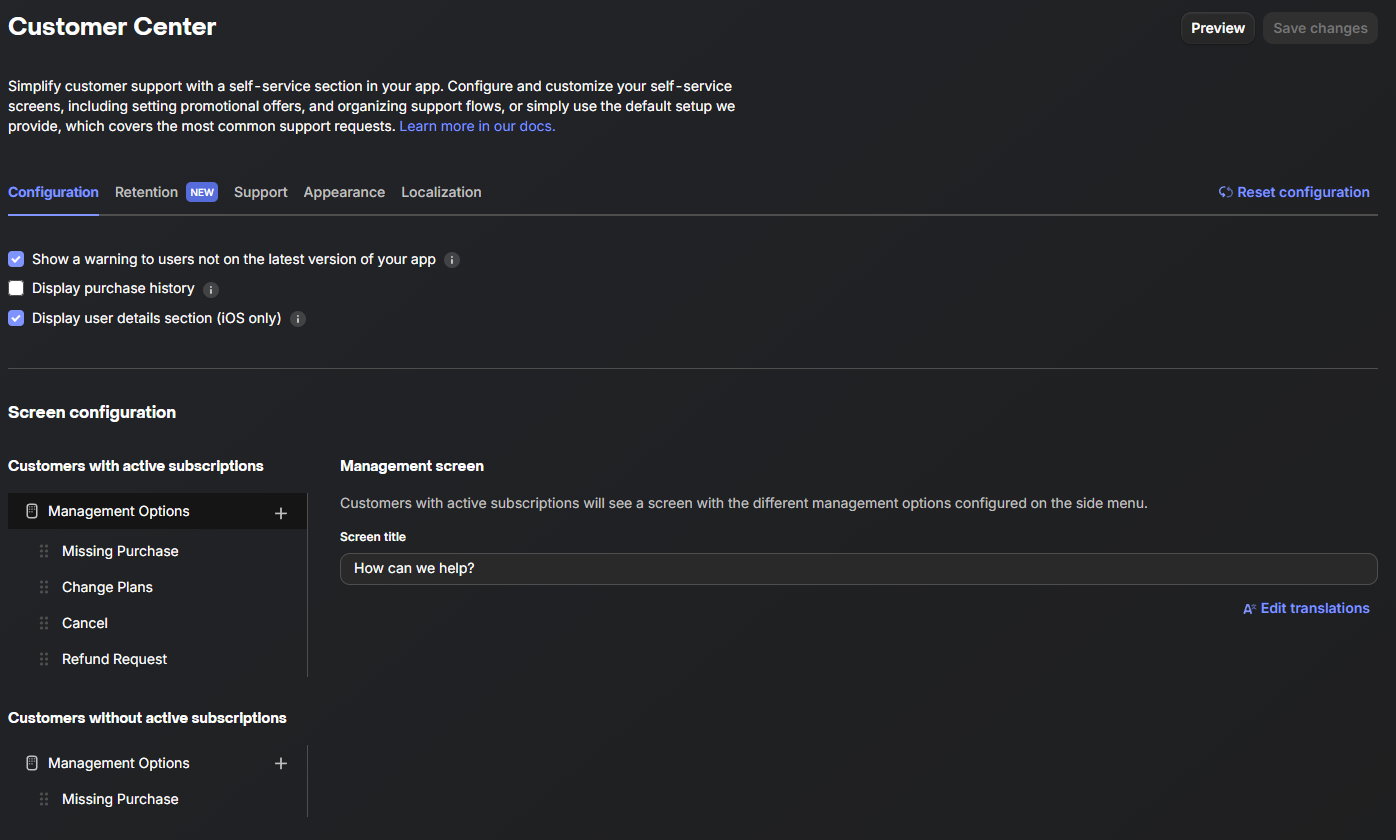
This is the configuration screen for deciding what options to provide to the customers. You can also configure retention offers which are offers that appears when your customer tries to cancel or request a refund.
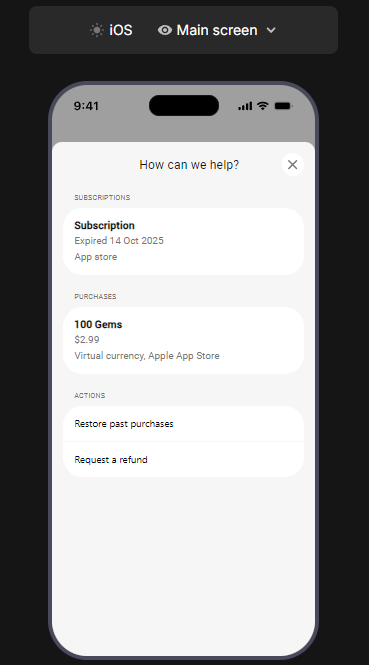
The customer's view of the UI. Simple but gets the job done.
All that is needed to display this in Flutter is: RevenueCatUI.presentCustomerCenter(). Very simple and very important for user experience.
And some downsides...
Very basic targeting system
Compared to Superwall, the targeting system leaves a lot to be desired to the point that it's almost unusable.
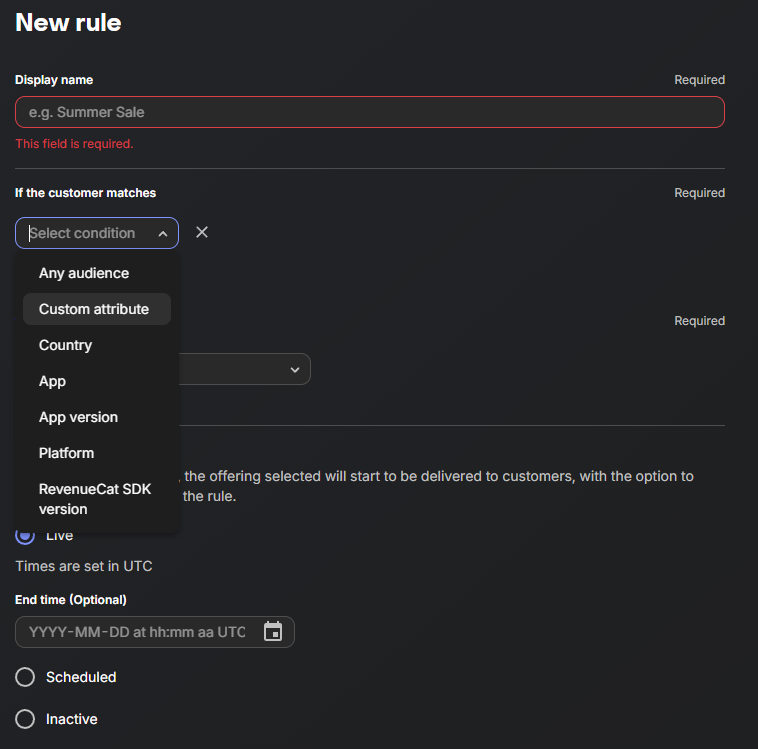
The available conditions are not very useful for my purposes. In Superwall I could show various paywalls based on what entitlements the user had or when they last saw a particular paywall. The best I can do here is make a custom attribute (maybe one per entitlement) and use that as an entitlement filter. To avoid having to write code, this would likely be a journey in Customer.io where I send an API request to update the customer when RevenueCat sends purchase, renewal, expiration events to Customer.io. Even then, the comparison operators are only "is any of" and "is not any of." So it would be impossible to, for example, create an attribute to hold a "last seen date" and implement a "last seen >= 3 days ago" within RevenueCat. I would have to store the data in a customer attribute then implement date comparison logic in code. This would require an app update just to change my targeting criteria.
Basic paywall editor
Something I really dislike about RevenueCat is that one paywall is tied to one offering. For the most part, this means one paywall is tied to one product, because an offering can't contain multiple monthly products, multiple yearly products, etc. One product per billing period, and one offering per paywall, so effectively one paywall per product. You can add "custom" billing periods to an offering to forcibly stuff a bunch of products into it, which might work well for consumables and non-recurring products, but it does not work for subscriptions. You can do it, but then the variables in the paywall editor (like product.price_per_month) become inaccurate.
There really isn't a whole lot to show for RevenueCat's editor but I'll cover a couple key pieces.
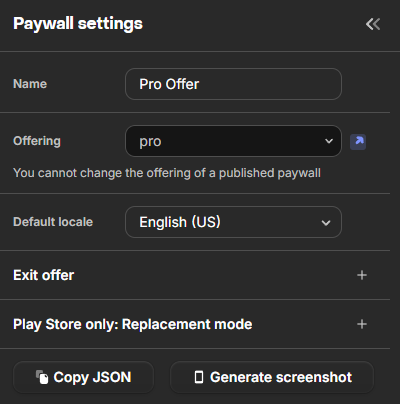
Pretty basic paywall settings. I think the "Replacement mode" is new -- as in added in the past day. It allows choosing how upgrades and downgrades are prorated. You can also set an exit offer (a separate paywall) if someone closes the paywall. I believe Superwall has this as well. No surveys or anything else here (I do not think RevenueCat supports surveys to begin with).
An interesting detail here is you can export the paywall's JSON but you cannot import it. I had Claude design me a paywall compatible with RevenueCat only to discover that importing a paywall is not supported. I have no idea what the purpose of the JSON is. Perhaps to use it in your app to display your own paywall, but I don't know what the point of that would be.
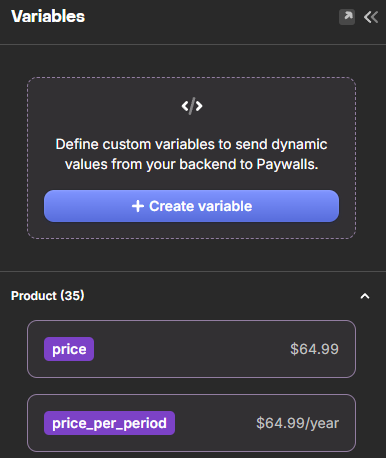
The variables system provides various predefined variables like price per month of an item, etc. (same as Superwall). I think the custom variables system is new -- I don't remember this being here when I first was researching RevenueCat, and its absence was a reason for choosing Superwall.
In principle, you send a value to the paywall when invoking it, and you can use that value in your paywall. Superwall is quite a bit more flexible here due to their dynamic value system mentioned above. In RevenueCat, it seems you can only use these variables as text. In Superwall, you can use the variables to drive conditional logic not strictly related to text, so they're a lot more powerful.
However...it seems like custom variables only work in native code, per RevenueCat's documentation. In the documentation examples, only SwiftUI, UIKit, and Kotlin are shown. I also checked the Expo and Flutter SDK references, and I couldn't find anything related to passing variables to the paywall. Since I use Flutter, this feature is effectively nonexistent to me if it's only available in native SDKs.
Fewer templates
Remember how Superwall had 182 templates? RevenueCat has 37. They have so few templates that they all fit into the screenshot below:
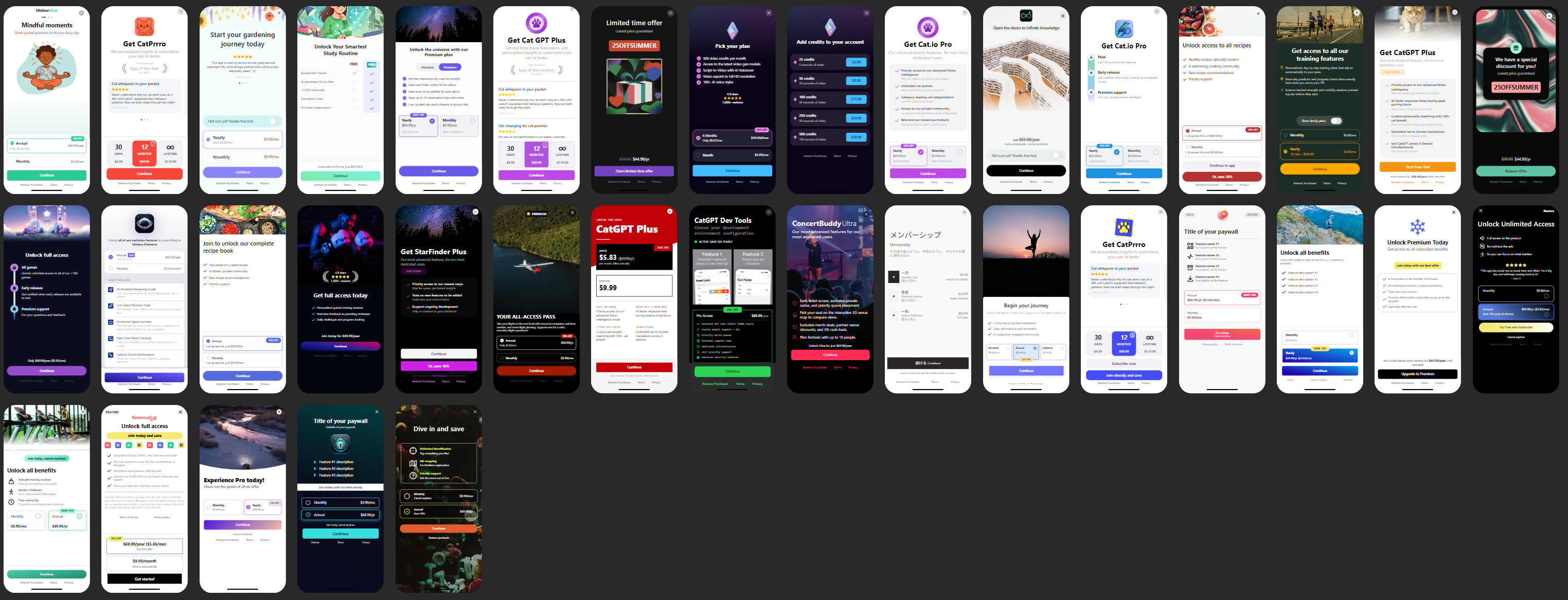
There aren't many templates, and I don't like them as much as Superwall's. However, they do have a template generator AI feature (have not tried it). And it is not all that difficult to make a template from scratch. You could reference Superwall's Paywall Screens site and copy one element by element. However, I think Superwall's clear superiority in terms of both templates and edit flexibility is why some people choose to use RevenueCat for tracking with Superwall for paywall display. It's a clear weakness on RevenueCat's part even though paywalls are a key component of monetization.
Migrating to RevenueCat
This was really simple and I completed it in about an hour with Kiro. And by an hour I mean I was in the gym for an hour and when I came back Kiro was done. It may have been much faster. There is, thankfully, not much code to change.
In Superwall's Flutter SDK, displaying a paywall is done like so (example from their docs):
Superwall.shared.registerPlacement('StartWorkout', feature: () {
    navigation.startWorkout();
});
A very cool feature of Superwall is feature gating. The placement StartWorkout would trigger a paywall campaign like shown in my screenshot above (the one with three audiences). When making paywalls, you can choose if the paywall gates a feature or not. If gated and the user does not purchase, the feature is locked. If non-gated and the user does not purchase, the feature is unlocked. This allows for really flexible feature gating with limited code. In the above example, if the user qualifies for a paywall and makes a purchase, the feature callback will run allowing them to start their workout. If the user didn't qualify for a paywall (maybe they are already subscribed), the feature callback will run in this case too. This means you can just use these three lines of code to gate a feature and Superwall will figure out if the user is allowed access to the feature or not -- no need to manually check for paywall responses, entitlements, etc.
In RevenueCat, it's only slightly more complicated. For one, like I've mentioned many times now, the targeting system in RevenueCat is practically archaic compared to Superwall. But they do offer a way to feature gate that will suit 90% of use cases, and that is by conditionally showing the paywall based on entitlement (and yes, only one entitlement). That is done like this:
await RevenueCatUI.presentPaywallIfNeeded('pro', offering: proWorkoutsOffering);This means the paywall will only show if the user doesn't have the pro entitlement. But unlike Superwall, that's not all the code you need. First, you need to load offerings:
final offerings = await Purchases.getOfferings();While this approach is sort of fool-proof in that you can't accidentally ask RevenueCat to load an offering that doesn't exist (unlike Superwall where the placement is just a string and it's up to you to ensure you pass a valid value), I don't like being forced to make network calls and maintain these offerings in a cache somewhere.
Secondly, you need to check the paywall result. presentPaywallIfNeeded's Future returns an enum of the following values: notPresented, cancelled, error, purchased, and restored. Basically, if the result is notPresented (user already had entitlement) or purchased, you can safely proceed with your feature. cancelled is a non-purchase so you should gate your feature.
restored is not so obvious: it only means the user tapped the restore button. It doesn't guarantee that the user now has the appropriate entitlement. You then need to reload the user's entitlements and check for the pro entitlement. (When clicking restore, you can see in Flutter's logs which entitlements were restored, so there is probably some listener you can configure to get this data without a fresh reload, but in any case you need to manually check the entitlement before proceeding.)
One strange thing about the restore button in RevenueCat is that it doesn't offer any feedback, at least in the case of having no entitlements to begin with (the only case I've tested so far). When I tap restore, it does briefly change to a loading state, but there is no feedback as to what (if anything) was restored upon completion, and the paywall does not close. Perhaps if I did already have the appropriate entitlement and restored it, the paywall would close or there would be some other feedback? I will test this, but at least in the case of not having any entitlements to restore, the UI feedback to the user could be better.
Anyway, those are the main differences between gating a feature in RevenueCat and Superwall. You can just write a helper function that gives you the equivalent of Superwall's feature callback functionality.
Final Thoughts
As you can see, there are a lot of merits of both platforms. Honestly, if Superwall didn't have these reliability issues that make me uneasy about using it, it would be my choice hands down. It is simply the better product -- or on its way to being that, considering that it is incomplete in some areas (like integrations). Still, I was able to do most of what I wanted to do in RevenueCat, and it happened to solve some issues I hadn't yet figured out in Superwall (like subscription management UI for users).
There are some details I didn't touch on like localization, but this is pretty important for me as well. Superwall charges for localization features ($49/month in addition to the MAR percentage) while RevenueCat provides it from their free plan (complete with AI translations). It's not a deciding factor for me because I would happily pay the $49 for a reliable platform, but I didn't get a chance to test Superwall's localization system since I am not paying that currently.
It looks like both of these platforms are steadily improving their product. On RevenueCat, a new feature appeared just today (as mentioned above), and custom variables weren't a thing (as far as I can remember) when I was initially evaluating it a few months ago. Similarly, Superwall is steadily adding new features, though I'd like to see them focus on reliability first. I can't imagine most people would want to use a platform where their paywalls might not show up, no matter how shiny and new that platform is.